STRUTS

1 範例簡介

這個範例取自於 STRUTS2 範例程式 Hello_World_Struts_2_Ant_2_3_1_2.zip,網址是 http://code.google.com/p/struts2-examples/downloads/list。 這個範例的主要功能是說明 APACHE ANT 工具在開發網頁應用程式上的方法和流程。

這個範例是作者在 ECLIPSE JAVA ENTERPRISE 的環境中建立的,有些檔案是 ECLIPSE 專屬的檔案,不講解它們的用途。 只講解 APACHE ANT 工具的功能和運作原理,以及編譯後如何部署到 TOMCAT 環境中運作。
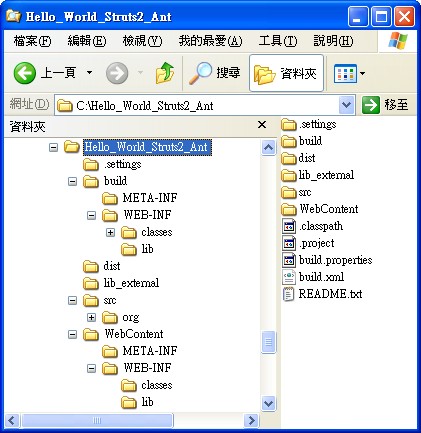
目錄結構:

jsp
目錄路徑說明
C:\Hello_World_Struts2_Ant根目錄,放置 ANT 編譯的檔案和其他子目錄,檔案包括 build.xml 和 build.properties。
C:\Hello_World_Struts2_Ant\build子目錄 build 放置編譯好的類別檔。
C:\Hello_World_Struts2_Ant\dist子目錄 dist 放置壓縮好的 WAR 檔,用於部署網頁應用程式。把這裡的檔案放到 %TOMCAT%\webapps 目錄後,TOMCAT 會自動解壓縮。
C:\Hello_World_Struts2_Ant\lib_external子目錄 lib_external 放置編譯 JAVA 程式檔過程中會使用到的外部函式庫。目前是空的。
C:\Hello_World_Struts2_Ant\src子目錄 src 放置 JAVA 原始程式碼目錄。
C:\Hello_World_Struts2_Ant\WebContent子目錄 WebContent 放置網頁應用程式,放置除 JAVA 類別檔之外,所有的網頁應用程式的檔案,包括 JSP 檔、JAR 檔、web.xml、struts.xml 等檔案。其中的 JAR 檔就是應用程式內部函式庫。

PART I: ANT 編譯原理與網頁執行


2 BUILD.PROPERTIES

檔案 build.properties 定義了幾個參數的值,這些參數值會加入到 build.xml,做為編譯參數。

網頁應用程式的名稱與版本字串。

   C:\Hello_World_Struts2_Ant\build.properties
01 app.name=Hello_World_Struts2_Ant
01 app.version=0.1

路徑字串參數,用於編譯與複製檔案。

   C:\Hello_World_Struts2_Ant\build.properties
01 source.home=./src
01 lib.home=./WebContent/WEB-INF/lib
01 lib.external=./lib_external
01 webapp.home=./WebContent
01 build.home=./build
01 dist.home=./dist

編譯參數,這些參數是 JAVA 編譯程式 JAVAC.EXE 的參數。

   C:\Hello_World_Struts2_Ant\build.properties
01 compile.debug=true
01 compile.deprecation=false
01 compile.optimize=true


3 BUILD.XML

宣告此 XML 檔的規則是 XML 1.0。

   C:\Hello_World_Struts2_Ant\build.xml
01 <?xml version="1.0" encoding="UTF-8"?>

所有關於編譯的內容和資訊都會包含在 project 的標籤內。 在 project 的標籤內宣告案子的名稱為 Hello_World_Struts2_Ant,內定完成的目標是 archive。 只要目標 archive 完成,編譯工作便結束。

   C:\Hello_World_Struts2_Ant\build.xml
01 <project name="Hello_World_Struts2_Ant" default="archive" basedir=".">
01 ....
01 </project>

設定描述器,用於說明案子的用途。

   C:\Hello_World_Struts2_Ant\build.xml
01 <description>
01        Basic Struts 2 Java Web Application
01 </description>

引入編譯的屬性檔,此檔案提供數個在編譯過程中會使用到的參數,包括目錄參數和其他參數。

   C:\Hello_World_Struts2_Ant\build.xml
01 <property file="build.properties"/>

目標一,清除 build 和 dist 目錄,這個動作的用意是清除先前編譯的結果。

   C:\Hello_World_Struts2_Ant\build.xml
01 <target name="clean" description="Delete old build and dist directories">
01 	<delete dir="${dist.home}"/>
01 	<delete dir="${build.home}"/>
01 </target>

目標二,建立 build 目錄,用來存放編譯後的 JAVA 類別檔(.class)。

   C:\Hello_World_Struts2_Ant\build.xml
01 <target name="init" depends="clean"  description="Create build directory">
01 	<mkdir dir="${build.home}" />
01 </target>

目標三,執行編譯工作,用來存放編譯後的 JAVA 類別檔(.class)。

   C:\Hello_World_Struts2_Ant\build.xml
01 <target name="compile" depends="init" description="Compile Java sources">
01 	<mkdir dir="${build.home}/WEB-INF/classes" />
01 	<javac srcdir="${source.home}"
01 			destdir="${build.home}/WEB-INF/classes"
01 			debug="${compile.debug}"
01 			deprecation="${compile.deprecation}"
01 			optimize="${compile.optimize}"
01 		     source="1.6" target="1.6">
01 		<classpath>
01 			<path>
01 		    	<fileset dir="${lib.home}" />
01 				<fileset dir="${lib.external}" />
01 		    </path>
01 		</classpath>
01 	</javac>
01 </target>

目標四,將相關檔案複製到 build 目錄,包括 XML 檔和 JAR 檔等。

   C:\Hello_World_Struts2_Ant\build.xml
01 <target name="build" depends="compile" description="Copies all non Java classes to build directoy">
01 	<copy todir="${build.home}">
01 		<fileset dir="${webapp.home}" excludes="SVN,**/*.class" />
01 	</copy>
01 	<copy todir="${build.home}/WEB-INF/classes">
01 		<fileset dir="${source.home}" excludes="SVN,**/*.java" />
01 	</copy>
01 </target>

目標五,製作 WAR 檔,將 dist 目錄的所有檔案製作成 dist\Hello_World_Struts2_Ant.war。 這個 WAR 檔可以放到 %TOMCAT%\webapps ,起動 TOMCAT 時就會自動解壓縮成網頁應用程式目錄 Hello_World_Struts2_Ant。 此時再以 http://localhost:8080/Hello_World_Struts2_Ant/ 就可以執行此網頁應用程式。

   C:\Hello_World_Struts2_Ant\build.xml
01 <target name="archive" depends="build" description="Create binary archive of all files in dist.home">
01 	<mkdir     dir="${dist.home}" />
01     <jar jarfile="${dist.home}/${app.name}.war"
01 			basedir="${build.home}" />
01 </target>


4 編譯與執行

到目錄 C:\Hello_World_Struts2_Ant,打入 ant,執行 ANT 編譯程序。
畫面中可以看到執行的目標是 clean,再來的順序依次是 init、compile、build、archive。

 Buildfile: C:\Hello_World_Struts2_Ant\build.xml

步驟一,執行目標 clean 清除了兩個目錄 dist、build。

 clean:
    [delete] Deleting directory C:\Hello_World_Struts2_Ant\dist
    [delete] Deleting directory C:\Hello_World_Struts2_Ant\build

步驟二,執行目標 init 重新建立 build 目錄。

 init:
     [mkdir] Created dir: C:\Hello_World_Struts2_Ant\build

步驟三,執行目標 compile 在 build 目錄建立 WEB-INF\classes 目錄,執行 javac 編譯 JAVA 程式碼。編譯產生了類別檔都會放在 classes 目錄。

 compile:
     [mkdir] Created dir: C:\Hello_World_Struts2_Ant\build\WEB-INF\classes
     [javac] C:\Hello_World_Struts2_Ant\build.xml:69: warning: 'includeantruntime' was not set, defaulting to build.sysclasspath=last; set to false for repeatable builds
     [javac] Compiling 2 source files to C:\Hello_World_Struts2_Ant\build\WEB-INF\classes
     [javac] warning: [options] bootstrap class path not set in conjunction with -source 1.6
     [javac] 1 warning

步驟四,執行目標 build 將網頁應用程式的相關檔案從 src 和 WebContent 目錄依照檔案路徑複製到 build 目錄的相對路徑。

 build:
      [copy] Copying 15 files to C:\Hello_World_Struts2_Ant\build
      [copy] Copying 3 files to C:\Hello_World_Struts2_Ant\build\WEB-INF\classes

步驟五,執行目標 archive 建立 dist 目錄,執行 jar 將 build 目錄中的檔案壓縮成 Hello_World_Struts2_Ant.war。

 archive:
     [mkdir] Created dir: C:\Hello_World_Struts2_Ant\dist
       [jar] Building jar: C:\Hello_World_Struts2_Ant\dist\Hello_World_Struts2_Ant.war
 BUILD SUCCESSFUL
 Total time: 2 seconds

將檔案 Hello_World_Struts2_Ant.war 複製到 C:\apache-tomcat-7.0.25\webapps。
TOMCAT 啟動過程中會自動將 webapps 目錄中的 WAR 檔解壓縮。
TOMCAT 啟動完成後,執行網頁瀏覽器,輸入網址 http://localhost:8080/Hello_World_Struts2_Ant/。

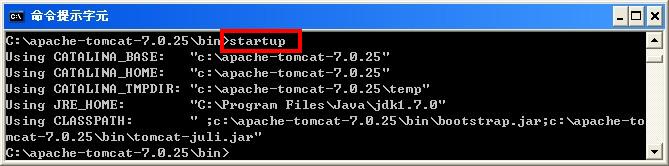
執行 C:\apache-tomcat-7.0.25\bin\startup.bat。

jsp

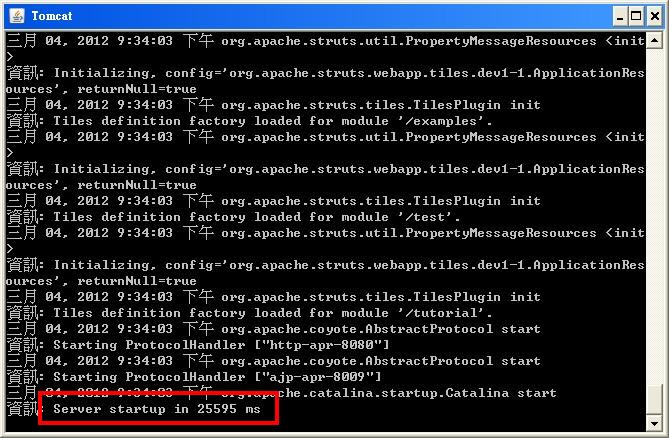
TOMCAT 啟動完成會出現 Server startup in ???? ms。

jsp

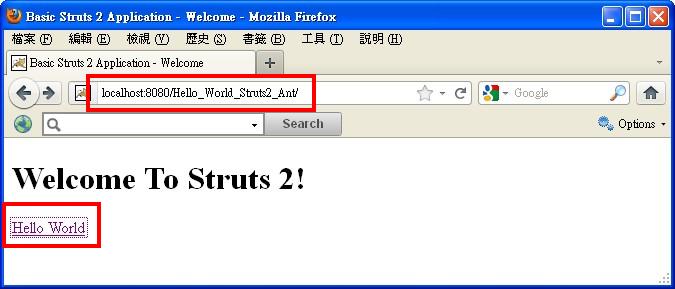
TOMCAT 啟動完成後,執行網頁瀏覽器,輸入網址 http://localhost:8080/Hello_World_Struts2_Ant/,進入 index.jsp。

jsp

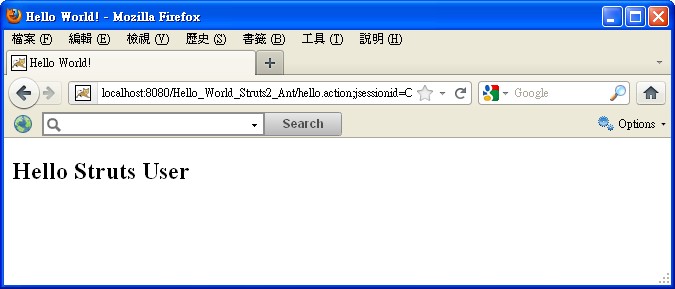
點入 Hello World,觸發動作 hello,轉送到網頁檔 HelloWorld.jsp。

jsp

PART II : 網頁應用程式


2、WEB.XML

WEB.XML 是 STRUTS 2 的部署描述器,用來宣告網頁應用程式的伺服程式(SERVLET),伺服程式會在網路伺服器的容器中執行。 一支網頁應用程式只會有一個 WEB.XML 檔案,可以在這個檔案中宣告多支支伺服程式和攔截器(FILTER)。

宣告此 XML 檔的版本規格,版本 XML 1.0,文字的編碼規格為 ISO-8859-1。

   WEB-INF\WEB.XML
01 <?xml version="1.0" encoding="UTF-8"?>

宣告此 XML 檔為網路應用程式 web-app,版本 2.4。 XML 命名空間為 http://java.sun.com/xml/ns/j2ee。 內容類型為網路應用程式 Web Application 2.2,根據的文件類型定義檔為 web-app_2_2.dtd。 後面的

   WEB-INF\WEB.XML
01 <web-app id="WebApp_ID" version="2.4" 
01 xmlns="http://java.sun.com/xml/ns/j2ee" 
01 xmlns:xsi="http://www.w3.org/2001/XMLSchema-instance" 
01 xsi:schemaLocation="http://java.sun.com/xml/ns/j2ee http://java.sun.com/xml/ns/j2ee/web-app_2_4.xsd">

定義顯示的網路應用程式名稱。

   WEB-INF\WEB.XML
01 <display-name>Hello_World_Struts2_Ant</display-name>

宣告攔截器,名稱為 struts2,執行的類別為 FilterDispatcher。 攔截器的用途是在網頁伺服器中,將屬於這個網頁應用程式的要求攔下,不理會其他要求,因此稱為攔截器(或過濾器)。

   WEB-INF\WEB.XML
01 <filter>
01    <filter-name>struts2</filter-name>
01    <filter-class>org.apache.struts2.dispatcher.ng.filter.StrutsPrepareAndExecuteFilter</filter-class>
01 </filter>

因為這個網頁應用程式沒有其他的伺服程式,所以要求攔截器接受所有要求。 當攔截器識別 STRUTS 2 的要求,基本上就是字尾是 .action 的要求,交由 STRUTS 2 系統處理。

   WEB-INF\WEB.XML
01 <filter-mapping>
01    <filter-name>struts2</filter-name>
01    <url-pattern>/*</url-pattern>
01 </filter-mapping>

設定歡迎頁為應用程式根目錄的網頁檔 index.html。

   WEB-INF\web.xml
01 <welcome-file-list>
01     <welcome-file>index.jsp</welcome-file>
01 </welcome-file-list>


3、STRUTS.XML

STRUTS 2 的網頁應用程式組態檔是在 WEB-INF\classes\struts.xml。 不同於 WEB.XML 是被網頁伺服器讀取,STRUTS.XML 是由網頁應用程式的伺服程式讀取,用來設定網頁應用程式的內部執行參數。

宣告文件為 XML 1.0 規範。

   WEB-INF\classes\struts.xml
01 <?xml version="1.0" encoding="UTF-8" ?>

宣告文件為 STRUTS 2.0 的組態檔。

   WEB-INF\classes\struts.xml
01 <!DOCTYPE struts PUBLIC
01     "-//Apache Software Foundation//DTD Struts Configuration 2.0//EN"
01     "http://struts.apache.org/dtds/struts-2.0.dtd">

啟用 devMode,這使得當要求所載入的資源出錯時,可以在錯誤頁上顯示相關資訊。
定義動作映射,當執行 index.action 時,會轉送到 index.jsp。
定義動作映射,當執行 hello.action 時,會先執行動作類別 HelloWorldAction,再轉送到 HelloWorld.jsp。

   WEB-INF\classes\struts.xml
01 <struts>
01     <constant name="struts.devMode" value="true" />
01 	<package name="basicstruts2" extends="struts-default">
01 		<action name="index">
01 			<result>/index.jsp</result>
01 		</action>
01 		<action name="hello" class="org.apache.struts.helloworld.action.HelloWorldAction" method="execute">
01 			<result name="success">/HelloWorld.jsp</result>
01 		</action>
01 	</package>	
01 </struts>


4、INDEX.HTML

歡迎頁 INDEX.HTML 是使用者要求所觸發的第一個網頁檔。 這個網頁檔顯示訊息字串 Hello World,點入後,觸發動作 hello,網頁轉送到 HELLOWORLD.JSP。
jsp

   index.jsp
01 <%@ page language="java" contentType="text/html; charset=ISO-8859-1" pageEncoding="ISO-8859-1"%>
01 <%@ taglib prefix="s" uri="/struts-tags" %>
01 <!DOCTYPE html PUBLIC "-//W3C//DTD HTML 4.01 Transitional//EN" "http://www.w3.org/TR/html4/loose.dtd">
01 <html>
01 <head>
01 <meta http-equiv="Content-Type" content="text/html; charset=ISO-8859-1">
01 <title>Basic Struts 2 Application - Welcome</title>
01 </head>
01 <body>
01 <h1>Welcome To Struts 2!</h1>
01 <p><a href="<s:url action='hello'/>">Hello World</a></p>
01 </body>
01 </html>


5、HELLOWORLD.JSP

HELLOWORLD.JSP 顯示動作轉送過來的 ACTIONFORM 表單資料,使用標籤讀取並顯示於網頁上。
jsp

   HelloWorld.jsp
01 <%@ page language="java" contentType="text/html; charset=ISO-8859-1" pageEncoding="ISO-8859-1"%>
01 <%@ taglib prefix="s" uri="/struts-tags" %>
01 <!DOCTYPE html PUBLIC "-//W3C//DTD HTML 4.01 Transitional//EN" "http://www.w3.org/TR/html4/loose.dtd">
01 <html>
01 <head>
01 <meta http-equiv="Content-Type" content="text/html; charset=ISO-8859-1">
01 <title>Hello World!</title>
01 </head>
01 <body>
01 <h2><s:property value="messageStore.message" /></h2>
01 </body>
01 </html>


7、HELLOWORLD.JAVA

動作類別 HelloWorld.class 會宣告一個 MessageStore 類別的實例。 此實例有一個字串 message,於實例建立時,由建構子設定初始值為 "Hello Struts User"。

   HelloWorld.java
01 package org.apache.struts.helloworld.action;
01 import org.apache.struts.helloworld.model.MessageStore;
01 import com.opensymphony.xwork2.ActionSupport;
01 public class HelloWorldAction extends ActionSupport {
01 	private static final long serialVersionUID = 1L;
01 	private MessageStore messageStore;
01 	public String execute() throws Exception {
01 		messageStore = new MessageStore() ;
01 		return SUCCESS;
01 	}
01 	public MessageStore getMessageStore() {
01 		return messageStore;
01 	}
01 	public void setMessageStore(MessageStore messageStore) {
01 		this.messageStore = messageStore;
01 	}
01 }


7、MESSAGESTORE.JAVA

動作類別 MessageStore 是一個 BEAN,因為它同時擁有 GETTER 和 SETTER 方法。 此類別有一個字串 message,建立實例時,會由建構子設定初始值為 "Hello Struts User"。

   MessageStore.java
01 package org.apache.struts.helloworld.model;
01 public class MessageStore {
01 	private String message;
01 	public MessageStore() {
01 		setMessage("Hello Struts User");
01 	}
01 	public String getMessage() {
01 		return message;
01 	}
01 	public void setMessage(String message) {
01 		this.message = message;
01 	}
01 }